Odds Panel
The Odds panel is your comprehensive browser for sports betting lines across multiple sportsbooks. Whether you're looking for the best price on a game, comparing how different books view an event, or simply browsing what's available to bet on, this panel puts all the odds at your fingertips.
Opening the Panel
Press / to open the Command Palette, type ODDS, and press Enter. The panel will load with a list of available sports.
Navigating the Three-Level Structure
The Odds panel is organized hierarchically, letting you drill down from high-level sport categories to specific events and their detailed odds.
Level 1: Sports
When you first open the panel, you see a list of all available sports. This might include football, basketball, baseball, hockey, soccer, tennis, golf, MMA, and more depending on what's currently in season and what sportsbooks are offering.
Click on any sport to see the events within that category.
Level 2: Events
After selecting a sport, you see a list of upcoming events—games, matches, or tournaments. For team sports, each row typically shows the two teams, the start time, and the number of betting markets available.
This view helps you find the specific matchup you're interested in. Scroll through to find today's games, tomorrow's games, or events further out.
Click on any event to see the detailed odds.
Level 3: Event Details
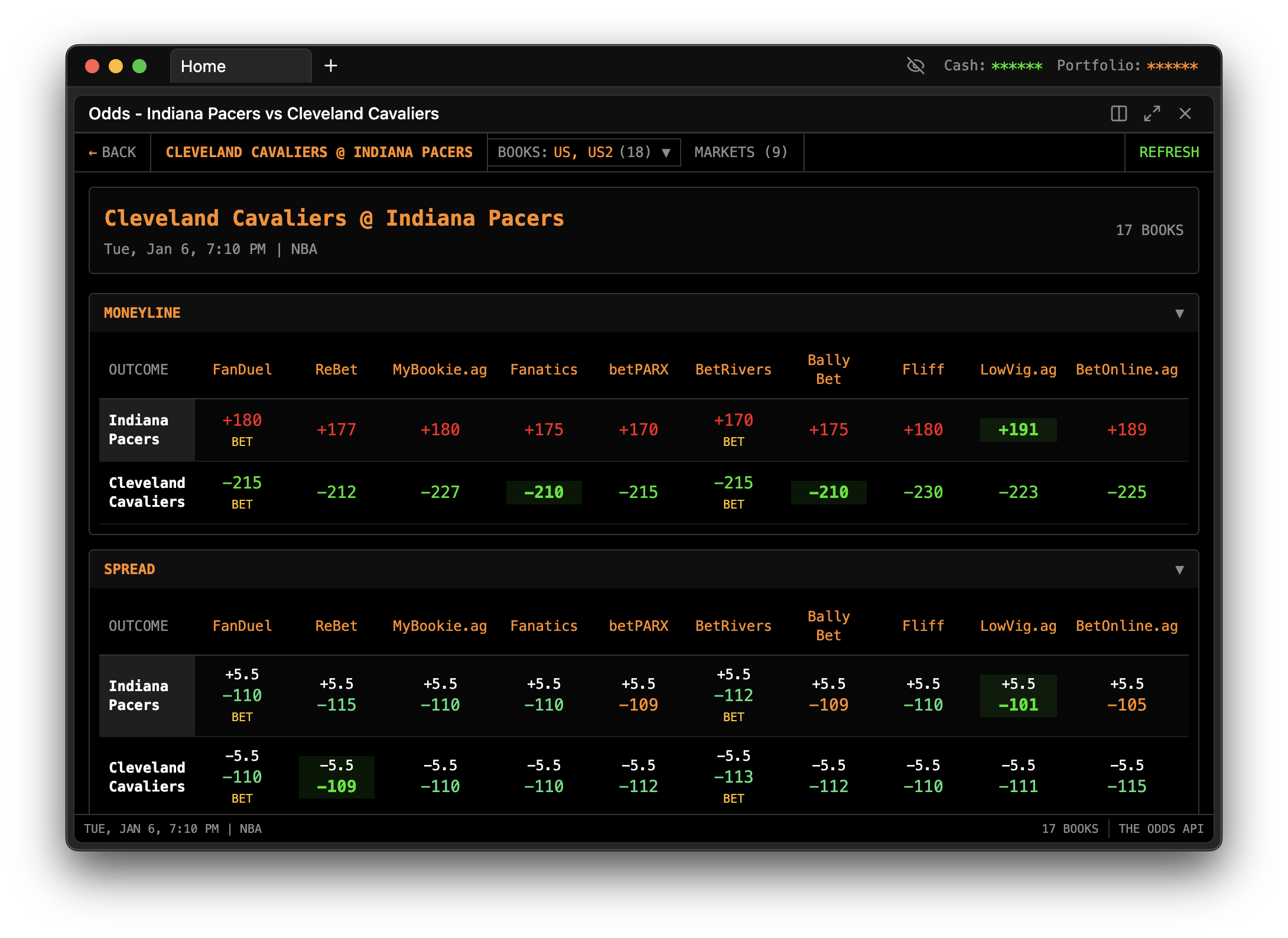
The deepest level shows all available betting markets for a specific event, with odds from multiple sportsbooks side by side. This is where you can compare lines and find the best prices.
You'll see different market types depending on the sport:
Moneyline: Who wins the game outright, no spread involved. One side will be favored (negative odds) and one will be the underdog (positive odds).
Spread/Point Spread: The favorite must win by more than a certain number of points; the underdog can lose by less than that number (or win outright). Common in football and basketball.
Totals (Over/Under): Betting on whether the combined score will be over or under a specified number.
Props and other markets: Depending on the event, you might see player props, first-half lines, alternative spreads, and other specialty bets.
Comparing Odds Across Books
The real power of the Odds panel is its side-by-side comparison. For each betting market, you'll see columns for different sportsbooks, each showing their current odds.
This layout makes line shopping effortless. Instead of opening five different sportsbook apps to compare prices, you see everything at once. If one book has the Lakers at -5.5 and another has them at -6, you know instantly where to place your bet if you like the Lakers.
Identifying the Best Odds
The panel typically highlights the best available odds for each outcome. Look for visual indicators showing which book has the most favorable line. These highlights draw your eye to where you should be betting for maximum value.
Even small differences matter. Getting -105 instead of -110 on a spread bet means keeping more of your winnings. Over hundreds of bets, these differences compound significantly.
The Panel Title Updates
As you navigate through the three levels, the panel title updates to reflect your current view. At the top level, it might say "Odds - Sports." When you've selected football, it shows "Odds - Football." When you're viewing a specific game, it shows something like "Odds - Lakers vs Celtics."
This helps you keep track of where you are, especially if you have multiple panels open.
Using Odds Panel with Other Tools
The Odds panel works well alongside the Arbitrage Scanner and +EV Scanner. While those tools automatically find opportunities, the Odds panel lets you manually explore and verify.
For example, if the +EV Scanner finds a bet, you might open the Odds panel to see the full context—what other books are offering, how the line has moved, and whether there are related bets you might also consider.
Some bettors use the Odds panel as their primary research tool, manually scanning for line discrepancies and market inefficiencies. Others use it mainly for verification and context around automated scanner findings.
Common Use Cases
Finding the best price: You've decided you want to bet the over on tonight's game. Before placing the bet, check the Odds panel to see which book offers the best number. Maybe most books have O 220.5 at -110, but one has O 220 at -108. That's where you should bet.
Spotting moved lines: By regularly checking the Odds panel, you develop a sense of where lines typically sit. When you notice a number that seems off—a line that's moved significantly from where it opened, or odds that don't match the market consensus—that's worth investigating.
Quick market overview: Before diving into specific bets, use the Odds panel to get a feel for the day's slate. Which games are offering value? Where is there disagreement among books? A quick scan can guide your focus.
Research before in-game betting: As a game progresses, odds change rapidly. The Odds panel gives you a snapshot of where different books stand, helping you make informed decisions during live betting.
When Odds May Be Delayed
The Odds panel fetches data periodically, which means there may be a slight delay compared to the live odds at each sportsbook. For most purposes, this delay is negligible—you're using the panel for comparison and discovery.
However, for time-sensitive bets (like arbitrage), always verify the live odds on the sportsbook's website before placing your bet. Odds can move between when the panel last updated and when you click "Place Bet."
Troubleshooting
If sports aren't appearing, check your internet connection. The panel needs to fetch odds data from external sources. Also note that not all sports are available year-round—if it's the offseason, you won't see as many options.
If a specific sportsbook isn't showing odds, that book may not offer the particular market you're viewing, or there may be temporary issues with that feed. Try checking other events or other sports to see if the book appears elsewhere.
If odds seem outdated, navigate away from the current view and back to force a refresh. The panel caches some data to improve performance, and navigating triggers a fresh fetch.